

Blog
See our posts on the most important topics in and around website design - from commissioning your own website to sustainability and accessibility, we cover the things that are important to you and to us.

Simplifying Forms to make them EAS(y)
Forms are one of the most common ways people interact with digital services. They are used to collect information, start processes, and enable decisions. When forms feel complex or demanding, people are more likely to abandon them or make mistakes.
To reduce barriers, improve clarity, and increase the completion rate, we design forms using a simple EAS(y) framework: Eliminate, Automate, Simplify.
The EAS framework was developed by Huei-Hsin Wang, a Senior Experience Specialist at the Nielsen Norman Group.
1) Eliminate
Fewer fields reduce effort and help people focus on what matters.
The first step is removing anything that does not serve a clear purpose. Many forms include fields that are not essential or are asked at the wrong time. Assess each question carefully and remove anything that does not directly support the goal of the form.
Concentrate on what information is vital to collect at this moment; once you have some data, no matter how basic, for example name and email, you can always go back later for more information.
2) Automate
Automation allows forms to adapt as they are being completed. By taking care of routine checks and decisions in the background, forms feel smoother to use and less repetitive, while reducing the risk of errors.
Common examples of automation include:
- Automatically formatting inputs like phone numbers or dates to ensure consistency
- Reusing known information so people do not have to enter the same details more than once
- Showing or hiding questions based on earlier answers, keeping the form focused and relevant
- Providing immediate guidance when something is missing or unclear, rather than displaying errors at the end
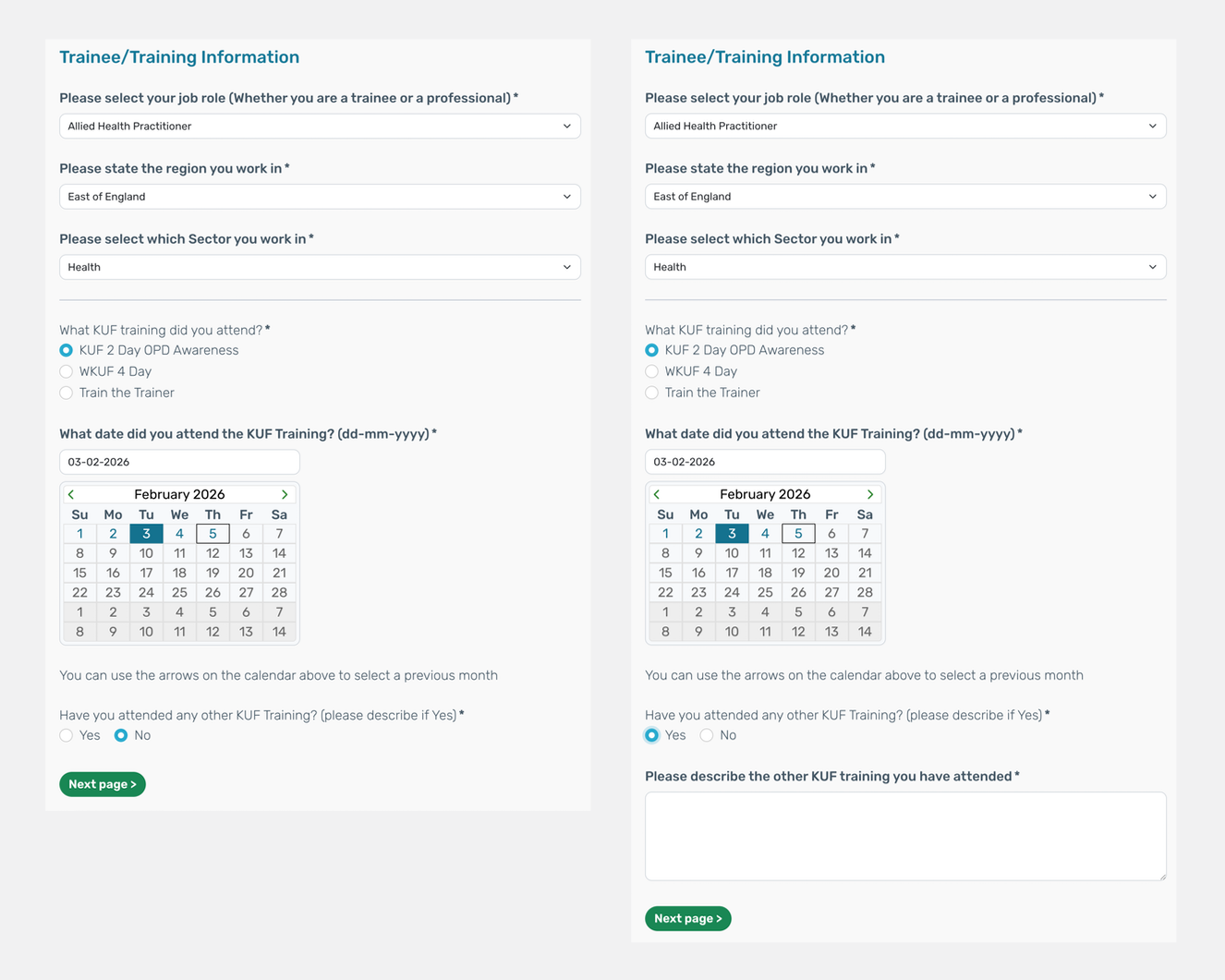
In the example below, you can see how automation supports the experience:
- Drop-down fields that guide selection and reduce manual input
- A date field where the format is handled by the form, allowing users to either type a date or select one from a calendar
- A conditional question that only reveals an additional field when a relevant option is selected
3) Simplify
Simplification is about clarity. Clear language, logical structure, and predictable interactions make forms easier to understand and complete. Design forms to work seamlessly across devices and for all users, ensuring accessibility is built in from the start rather than added later.
Why It Matters
Forms often ask for sensitive or important information. A well-designed form builds trust, reduces fatigue, and supports accurate responses. A poorly designed one creates friction and can discourage participation.
Eliminate, Automate, Simplify keeps the focus on creating forms that are respectful, inclusive, and effective.
Ready to improve how your forms perform?
If your forms are harder to complete than they need to be, we can help. Get in touch to see how a simpler approach can make a measurable difference.


